

AI Human Handoff for Law Firms: Escalate Sensitive Calls with Intake Context
Peak Demand builds Voice AI workflows that know when to stop automating and move a call to the right human — with the caller identity, matter context, important dates, requested next step, routing reason, and actions already attempted preserved for staff review.
Pass structured intake instead of making staff restart the conversation from zero.
Choose which calls transfer, queue, callback, notify, or move to review.
Legal advice, representation, conflict clearance, merits, and sensitive exceptions remain under firm control.
The best automation knows where automation should end.
Legal calls can become sensitive, ambiguous, emotionally charged, time-sensitive, or judgment-dependent. A strong Voice AI workflow should not force every interaction through automation. It should recognize the firm-defined point where a lawyer, intake specialist, receptionist, case team, or other authorized staff member needs to take over.
Sensitive questions
Move legal advice requests, complaints, engagement questions, unsupported exceptions, and other configured categories into human review.
Ambiguous routing
If the correct practice area, office, matter owner, or next action is unclear, preserve the context and route to staff instead of guessing.
Caller requests a human
Apply the firm's approved policy when a caller asks for a lawyer, receptionist, assigned counsel, case team, or other live destination.
Configured escalation
Use approved triggers such as caller-stated dates, active-matter context, sensitive categories, or priority rules to change the workflow.
Capture enough context to make the human takeover useful.
The goal is not simply to transfer the phone. The goal is to move the interaction with enough organized context that the human recipient understands who is calling, why they called, what was collected, and what the Voice AI already attempted.
1. Identify the caller
Capture approved identity, callback, new-versus-existing-client, office, matter, or relationship information.
2. Capture the issue
Record the caller's reason for contacting the firm, relevant caller-stated dates, and the requested next step.
3. Trigger the handoff
Apply the firm's configured rule for live transfer, callback, queue, on-call escalation, notification, or staff review.
4. Preserve the record
Send the structured summary, handoff reason, destination, and attempted action into the connected workflow.
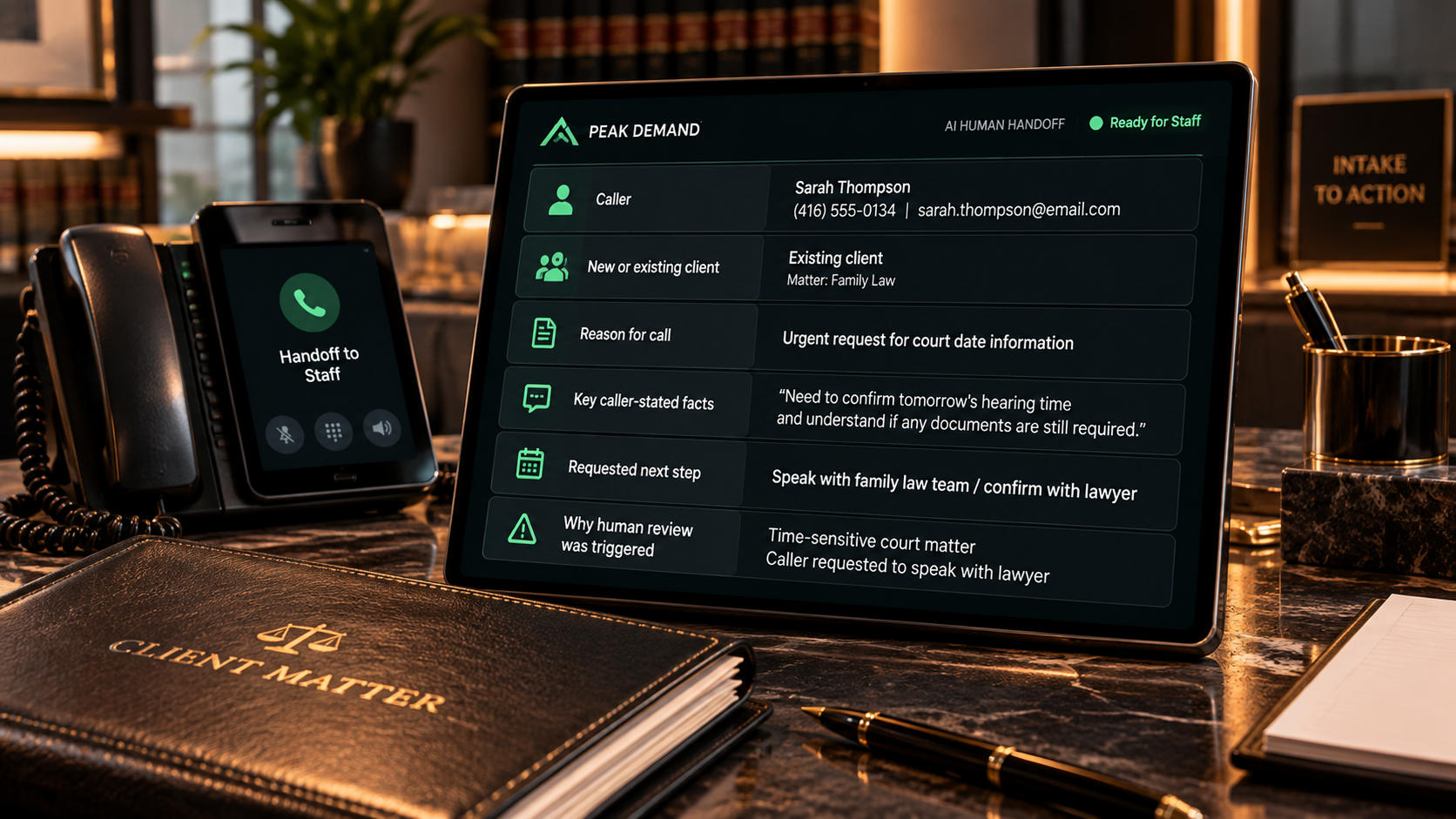
Give the human recipient a structured starting point, not a vague transfer.
The exact handoff record should be configured around the firm's practice areas and processes, but the most useful context often combines caller identity, relationship to the firm, matter description, important caller-stated dates, requested next step, and the action already attempted.
Caller identity
Name, callback number, preferred contact method, language, office or location, and other approved contact fields.
Relationship to the firm
New inquiry, existing client, referral source, opposing or third party, family member, court contact, or another configured caller type.
Matter context
Practice-area intake category, active matter where available, parties, caller-stated facts, documents mentioned, and the reason for contact.
Requested next step
Live conversation, lawyer callback, appointment, document question, case-team contact, staff review, or another approved action.
Preserve caller language.
Distinguish what the caller actually said from what the workflow summarized or did. Do not turn a caller's concern into a legal conclusion.
Document the handoff reason.
Staff should be able to see why the call moved to a human and whether a transfer, callback, notification, or review action already occurred.
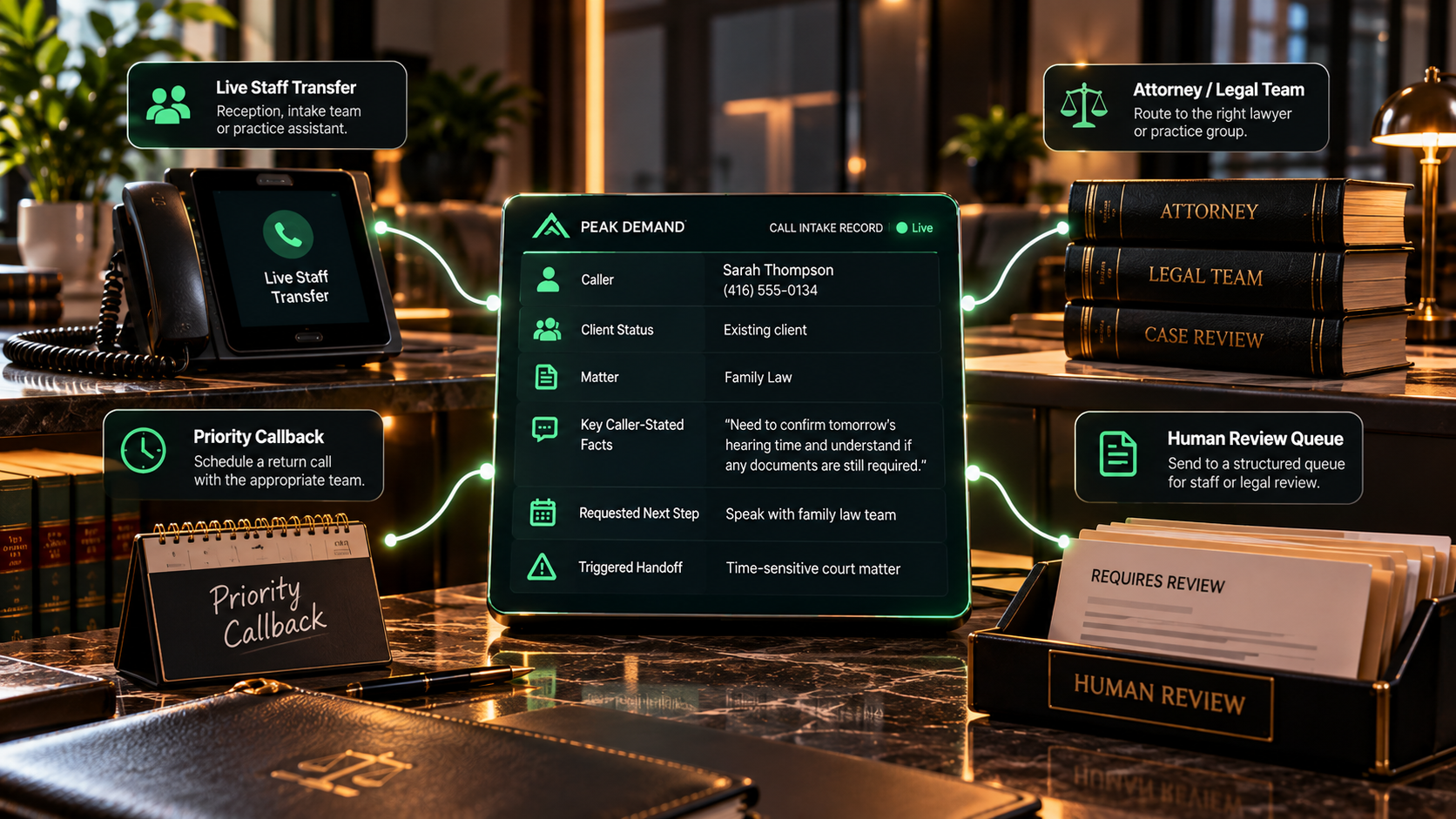
Human handoff does not have to mean one transfer destination.
Different calls can move into different human-controlled paths depending on the caller type, practice area, staff schedule, issue category, office, active matter, language, availability, and other firm-defined operational rules.
Live staff transfer
Attempt the designated receptionist, intake specialist, lawyer, practice group, office, or other live destination.
Priority callback
Create a structured callback request with the collected context, ownership, preferred timing, and review reason.
Human review queue
Send ambiguous, sensitive, unsupported, conflict-dependent, or judgment-based situations to a staff-review workflow.
On-call escalation
Use the firm's night, weekend, holiday, or practice-specific on-call schedule when the configured rules permit it.
A failed transfer should create a next action — not a dead end.
Human handoff needs a designed fallback for busy lines, unavailable staff, closed offices, failed integrations, incomplete information, and calls that fall outside normal routing rules.
Retry or alternate destination
Attempt another approved line, team, office, or staff destination when the first transfer cannot complete.
Create a structured callback
Preserve the intake, reason for escalation, failed action, and callback details rather than asking the caller to start over later.
Notify & queue
Create the configured alert or review item in the connected system so the call has documented ownership and follow-up.
System confirmation should control the wording. If the connection fails, move into the firm's documented fallback rather than creating a false handoff.
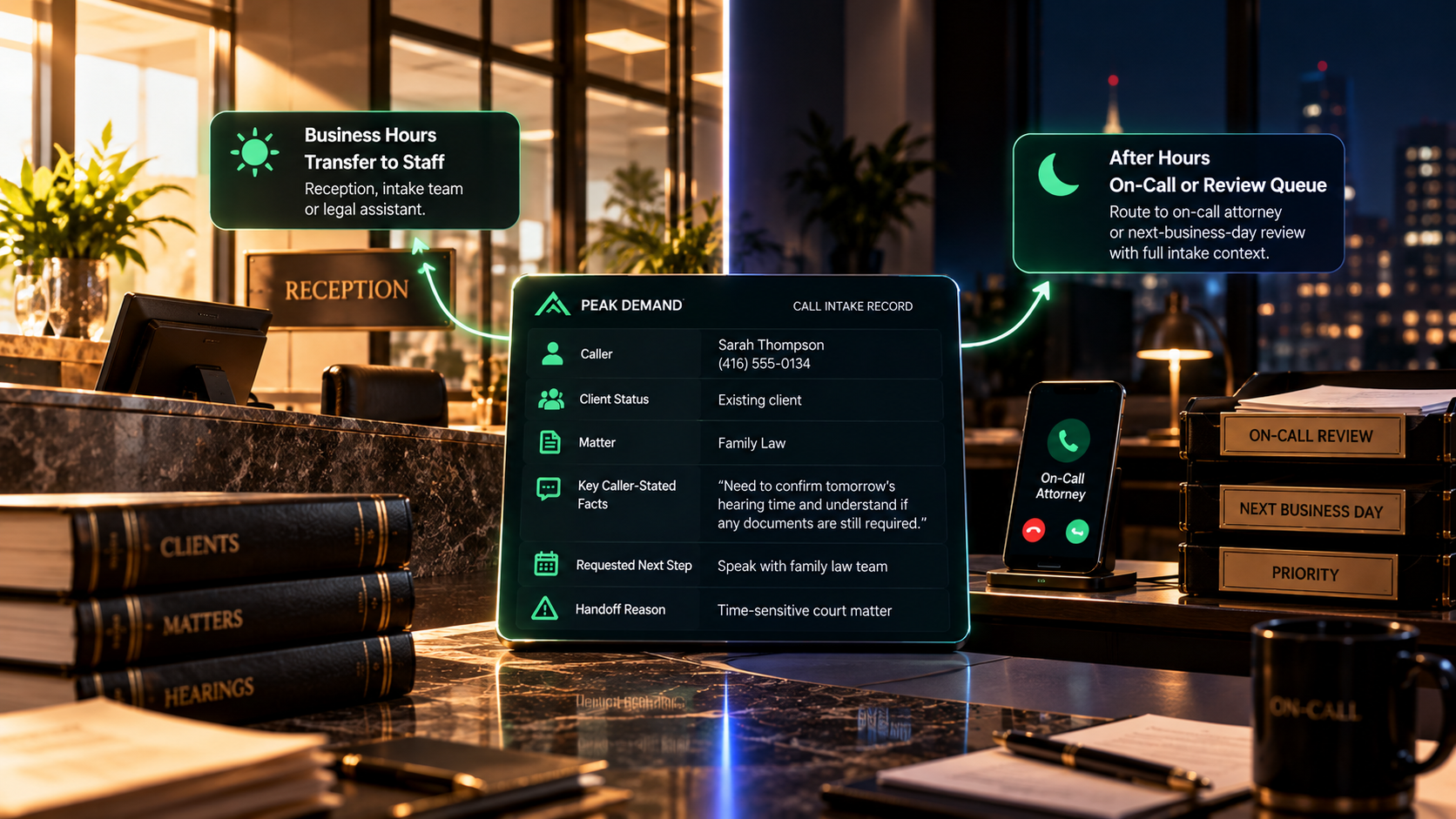
The human destination can change when the office closes.
Business-hours transfers may go to reception or an intake team, while nights, weekends, and holidays may use an on-call attorney, designated escalation contact, priority callback queue, or next-business-day review path.
Business hours
Route to reception, intake, a practice group, assigned lawyer, case team, or other staffed destination.
After hours
Apply the firm's approved on-call or priority-review rules using the schedule that is actually in effect.
Next-business-day handoff
When no live destination is required or available, create a structured follow-up item with the call context already attached.
The transfer, record, notification, and follow-up should stay connected.
Peak Demand can design the middleware and integration layer around approved telephony, CRM, practice-management, calendar, messaging, notification, and custom systems so the human recipient receives the context in the tools the firm already uses.
Telephony
Attempt live transfer, conference, office routing, on-call routing, or other permitted phone actions and record whether the action completed.
Practice management
Create or update the contact, intake, matter, task, note, review status, owner, and other approved fields.
Notifications
Send the configured alert to the appropriate team with enough context to understand why the handoff occurred.
Follow-up actions
Create callbacks, review tasks, consultation requests, reminders, or other approved actions when a live handoff is not the final step.
Human handoff should protect the decisions that require human judgment.
The Voice AI can collect caller-stated information, provide approved administrative information, identify configured handoff signals, attempt authorized routing actions, and create structured records. Legal advice, representation, conflicts, merits, deadlines, privilege, substantive strategy, and sensitive exceptions remain with the firm's authorized process.
Build the handoff around your staff, schedules, practice areas, and exceptions.
Peak Demand can map the exact questions, handoff signals, transfer destinations, review gates, staffing schedules, after-hours rules, connected actions, notifications, and fallbacks that fit the firm instead of forcing every call through a rigid receptionist flow.
Define the triggers
Map which caller requests, categories, client states, dates, issue types, system conditions, and uncertainty signals should move the call to a human.
Define the destinations
Map reception, intake, lawyers, practice groups, offices, case teams, on-call contacts, callback queues, and staff-review destinations.
Define the fallback
Specify what happens when a destination is unavailable, a transfer fails, an integration is down, or the call cannot safely remain automated.
Connect human handoff to intake, triage, summaries, and existing-client routing.
Legal Intake Automation
Collect structured legal-intake information before review, routing, consultation, or human takeover.
Urgent Call Triage
Recognize firm-defined time-sensitive signals and move the call into the appropriate priority or human-review path.
AI Call Summaries
Create structured call notes that preserve caller context for faster lawyer and staff follow-up.
Existing-Client Routing
Separate active-client calls from new intake and route current matters toward the appropriate legal team.
Questions law firms ask about escalation, transfer, intake context, and human review.
These answers focus on when the workflow should move to a human, what context should travel with the call, how live transfers and callbacks work, fallback handling, after-hours destinations, and the decisions that remain human-controlled.
What is AI human handoff for law firms?
When should a law firm use human handoff?
Can the AI transfer a caller live to staff?
What information should be sent with a human handoff?
Can the AI summarize the call before transfer?
Can the AI decide whether the firm should accept a matter?
Can human handoff work for existing clients?
Can new-client calls be handed off differently?
Can the AI hand off a call because the caller asks for a lawyer?
What happens when a live transfer fails?
Can different practice areas use different handoff rules?
Can the handoff route to a specific lawyer?
Can the AI hand off calls after hours?
Can the AI determine that a caller has a legal emergency?
Can the AI give legal advice before handing off?
Can the handoff include conflict-check information?
Can the handoff create a callback instead of a live transfer?
Can the handoff notify staff through more than one channel?
Can the workflow tell whether the caller is new or existing?
Can the handoff preserve the caller's exact wording?
Can the AI transfer highly sensitive calls immediately?
How does human handoff reduce repeated questions?
Can a handoff be triggered by system uncertainty?
Can Peak Demand build custom human-handoff rules?
What should a law firm bring to a human-handoff discovery call?
Need your Voice AI to know exactly when to bring a human into the call?
Peak Demand can map, build, connect, test, monitor, and improve a human-handoff workflow around your intake requirements, practice areas, staff roles, transfer destinations, review gates, schedules, on-call structure, system actions, and fallback rules.
The Voice AI can gather context and move the call faster. Your firm remains in control of advice, conflicts, representation, merits, deadlines, strategy, and sensitive exceptions.