

AI Urgent Call Triage for Law Firms: Identify Time-Sensitive Inquiries and Escalate Faster
Peak Demand builds Voice AI workflows that identify firm-defined urgency signals, capture the caller's stated timing and matter context, and move the call into the correct priority, callback, live-transfer, or human-review path — without letting automation make the legal judgment.
Capture dates, events, and concerns exactly as the caller provides them.
Apply configured operational rules instead of inventing legal urgency.
Move priority calls to the right lawyer, team, queue, or on-call path with context.
A time-sensitive caller should not disappear into the same queue as every other call.
Legal firms receive calls where timing matters operationally: a caller may mention a hearing, service, police contact, a transaction date, an existing matter, an event that just occurred, or another fact the firm wants reviewed quickly. The challenge is responding faster without letting an automated receptionist turn those facts into a legal conclusion.
Hear the timing concern
Let the caller explain what happened and what date, event, or immediate concern is driving the call.
Capture usable context
Collect the approved facts the lawyer or intake team needs before deciding what the situation means legally.
Move it faster
Apply the firm's operational priority rules so the call reaches the right review path sooner.
Urgent triage should identify signals, preserve context, and hand judgment to humans.
The Voice AI can recognize the firm's configured indicators, ask approved follow-up questions, create a structured summary, and trigger the correct escalation path. It should not calculate a deadline, determine whether a matter is legally urgent, or tell the caller what they should do legally.
Listen for configured signals
Recognize caller-stated dates, events, existing-client status, key phrases, or other firm-defined routing inputs.
Ask safe follow-up questions
Collect only the approved context needed to route or escalate the call without conducting legal analysis.
Assign an operational priority
Apply the firm's workflow label or queue based on configured rules, not an AI-created legal conclusion.
Escalate with context
Send the intake to a lawyer, on-call contact, priority review queue, callback workflow, or other approved destination.
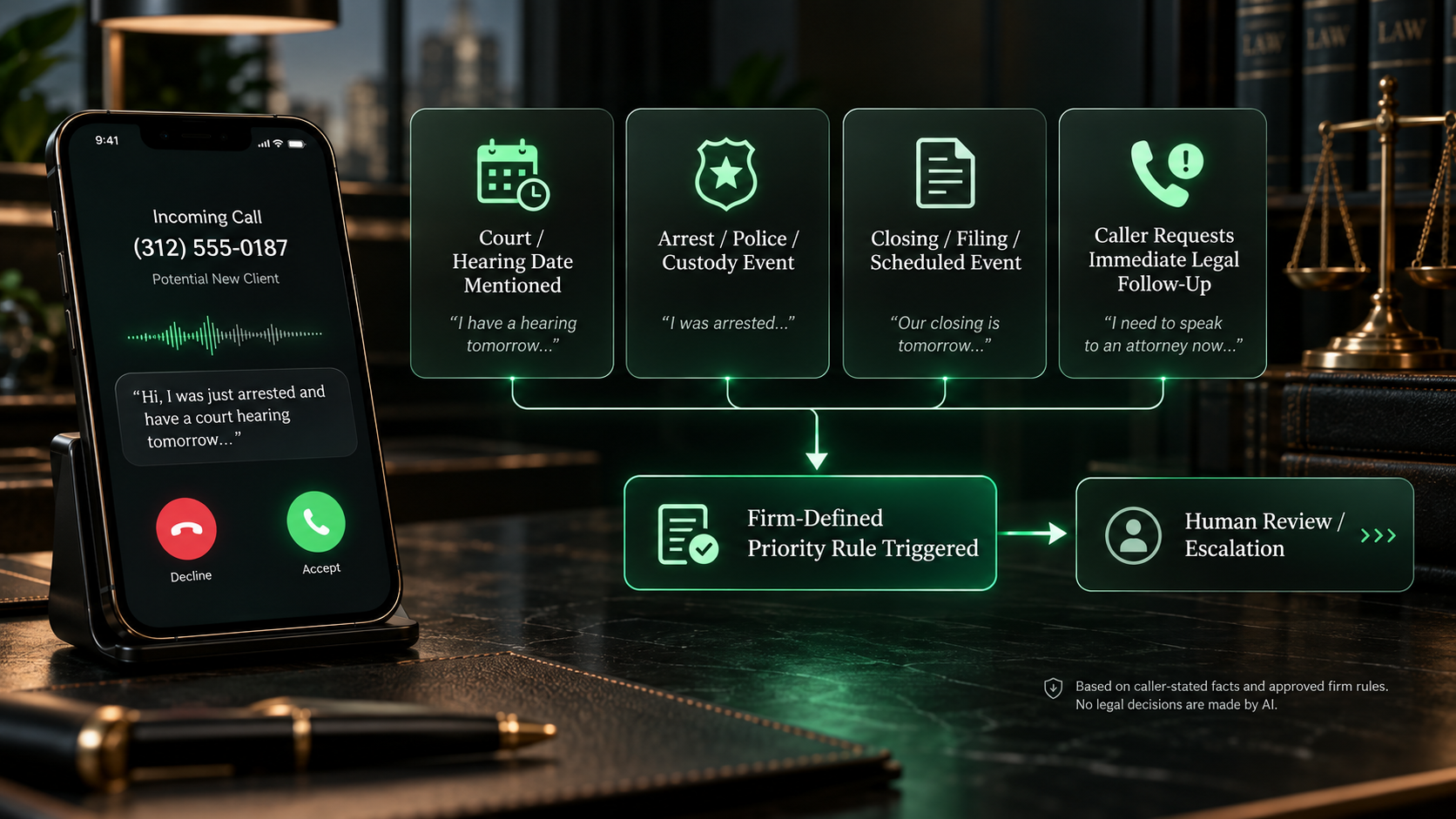
The firm decides what should trigger priority review.
Different practices have different reasons to accelerate a call. The automation should be configured around the firm's own examples, terminology, risk controls, operating hours, and escalation destinations.
Caller-stated dates
Dates for hearings, meetings, notices, service, transactions, appointments, or other events the caller says are approaching.
Recent events
A caller may describe an arrest, police contact, termination, service of documents, accident, business event, or another recent development the firm wants reviewed quickly.
Existing-client context
An active client calling about a current matter can follow a different priority path from a new prospective-client inquiry.
Firm-specific phrases
Configured language can trigger additional questions or staff review, but broad words such as “urgent” do not have to create automatic legal conclusions.
The system can move a call to the front of a workflow based on the firm's rules while leaving the legal significance of the facts to qualified counsel.
When a priority call reaches staff, the context should already be organized.
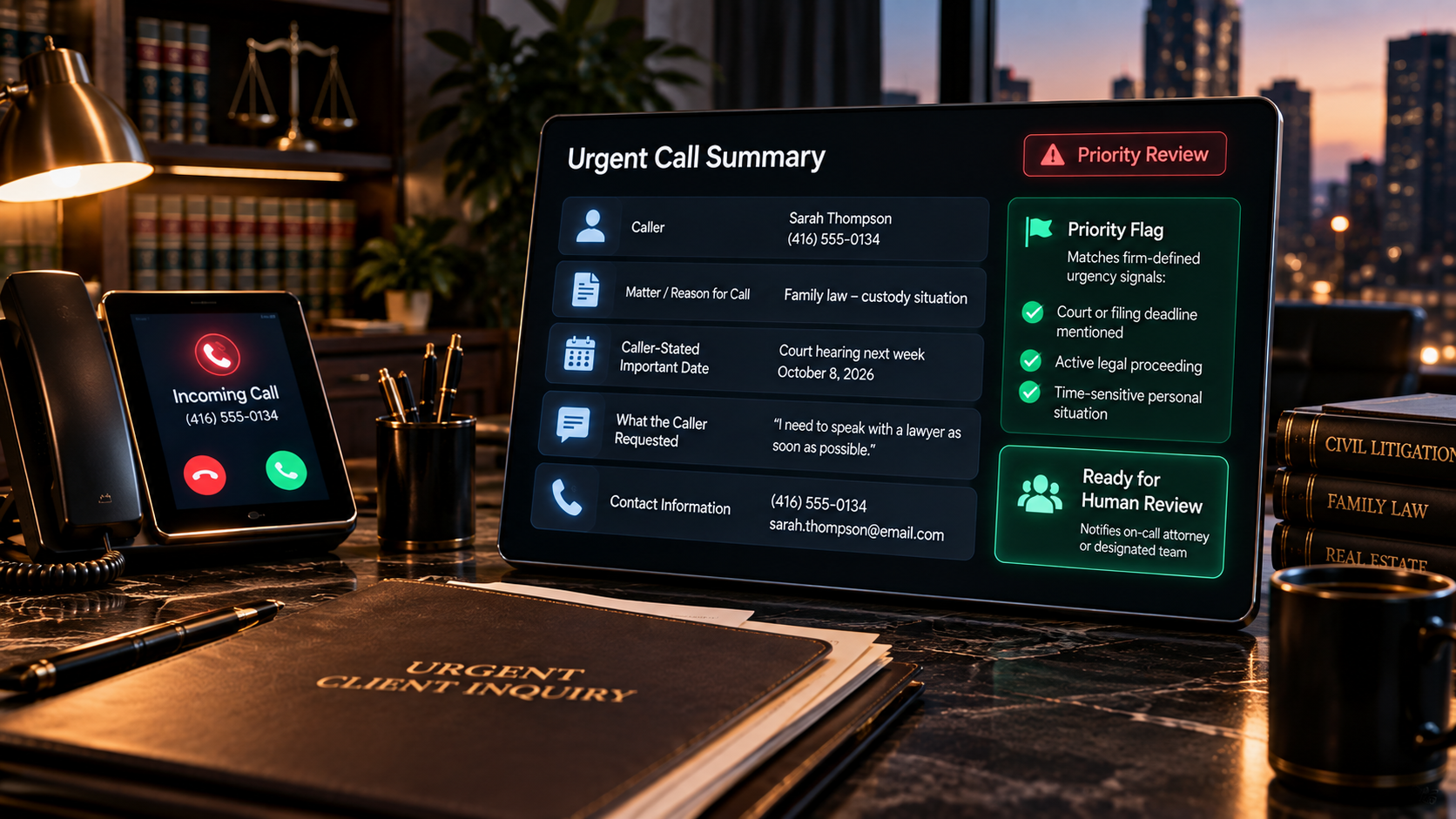
Fast escalation is more useful when the lawyer or intake team receives the caller's basic identity, relationship to the firm, matter context, stated dates, reason for concern, and the action the Voice AI already attempted.
Caller identity
Name, callback number, preferred contact method, location, language, and other approved contact fields.
New or existing client
Identify whether the caller is a new inquiry, current client, referral source, court contact, family member, or another configured caller type.
Matter context
Practice area or intake category, parties, office, assigned lawyer, matter number where available, and the caller's description.
Timing context
Record the date, event, notice, hearing, appointment, transaction, or other time-sensitive fact exactly as the caller states it.
Preserve caller language.
Structured summaries should distinguish what the caller said from what the workflow did. The system should not rewrite a caller's concern into a legal conclusion.
Document the attempted action.
Staff should be able to see whether the AI attempted a transfer, created a callback, sent an alert, booked an approved appointment, or moved the intake into a review queue.
Not every priority call needs the same destination.
The correct next step can change by practice area, office, time of day, existing-client status, assigned lawyer, on-call schedule, available staff, or the exact signal that triggered the priority workflow.
Live staff transfer
Attempt the designated receptionist, intake specialist, lawyer, practice group, or office when staff are available.
On-call escalation
Use the firm's night, weekend, or holiday on-call schedule for the specific categories the firm approves.
Priority callback
Create a structured callback request with the required context, ownership, and notification rules.
Human review queue
Send ambiguous, sensitive, unsupported, or legally judgment-based situations to authorized staff rather than guessing.
Priority handling can change when the office is closed.
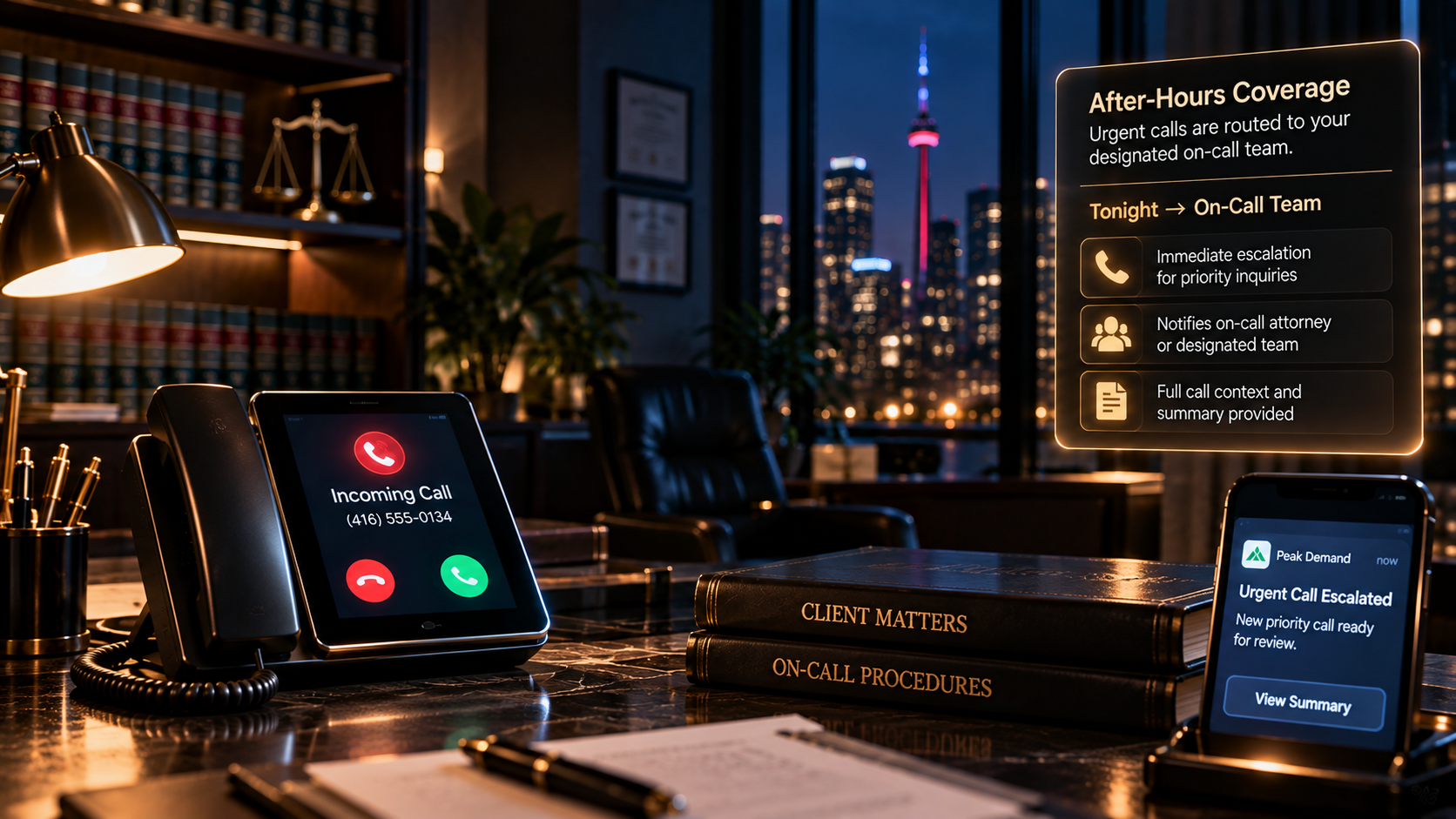
A law firm's after-hours triage rules may be intentionally narrower than daytime rules. The Voice AI can identify configured signals, collect the minimum approved information, attempt on-call escalation where permitted, and preserve a priority handoff if immediate transfer is unavailable.
Business-hours route
Try the appropriate live staff, practice group, or attorney according to the firm's normal routing logic.
On-call route
Apply the approved on-call schedule only to call categories the firm has authorized for nights or weekends.
Morning priority handoff
If no immediate destination is available, create a structured first-review item with clear ownership and caller context.
Urgent triage becomes stronger when the escalation action is connected.
Peak Demand can connect Voice AI to approved practice-management platforms, CRMs, calendars, messaging tools, telephony, staff notifications, task systems, databases, and custom middleware so priority calls can create auditable next steps.
Priority records
Create or update an intake record with caller context, priority label, timestamps, summary, and current workflow state.
Alerts & notifications
Notify approved staff through connected channels when a configured priority or escalation rule is triggered.
Transfer & fallback logic
Attempt the primary destination, detect failure where supported, and move to the approved backup path.
Audit trail
Preserve the signal detected, information collected, action attempted, outcome returned, and any item still requiring human review.
The AI can accelerate the workflow without deciding what the law requires.
Urgent-call automation should be designed to recognize operational signals and move information faster. Legal significance, legal deadlines, advice, conflicts, representation, case strategy, and substantive judgment remain under the firm's control.
The workflow moves information and calls according to the firm's rules; lawyers and authorized staff decide what the facts mean and what should happen legally.
Urgent legal call triage should match the firm's real escalation map.
Peak Demand builds the Voice AI, routing logic, integrations, fallbacks, alerts, and monitoring around the firm's actual practice areas, priority rules, offices, staffing model, on-call schedule, and human-review requirements.
Define the signals
Map the caller-stated facts, dates, phrases, categories, client status, and timing rules that should change the workflow.
Define the destinations
Map the lawyers, teams, office lines, on-call contacts, review queues, callbacks, and notification channels available for each path.
Define the fallbacks
Specify what should happen when a transfer fails, staff are unavailable, information is incomplete, or the call falls outside the automated rules.
Connect triage to intake, escalation, after-hours coverage, and human handoff.
Legal Intake Automation
Collect structured legal-intake information before routing, review, consultation, or follow-up.
Urgent Matter Escalation
Go deeper into the workflow that moves time-sensitive inquiries into human review.
On-Call Attorney Escalation
Apply approved night and weekend rules for calls that may need an on-call destination.
AI Human Handoff
Escalate sensitive or review-required calls with the intake context already organized.
Questions law firms ask about time-sensitive calls, priority routing, and escalation.
These answers focus on caller-stated urgency signals, safe intake, operational prioritization, human escalation, after-hours rules, integrations, and the legal decisions that remain with lawyers and authorized staff.
What is AI urgent call triage for law firms?
Can Voice AI determine whether a legal matter is truly urgent?
What kinds of time-sensitive details can the AI capture?
Can the AI calculate legal deadlines?
Can urgent calls be escalated to a lawyer immediately?
What happens if no lawyer is available?
Can the workflow handle urgent calls after hours?
Can different practice areas have different urgency rules?
Can the AI distinguish a new inquiry from an existing-client urgent call?
Can the AI transfer the caller live?
What context should be included in a human handoff?
Can the AI tell a caller that their situation is legally urgent?
Can the AI give emergency legal advice?
Can the workflow prioritize calls without creating a legal conclusion?
Can urgent calls be sent to different offices or teams?
Can the AI create an urgent task in our practice-management system?
What happens if the practice-management integration fails?
Can the AI collect names for conflict review during an urgent call?
Can a caller bypass the urgent path if the trigger was a false positive?
How should sensitive or distressed callers be handled?
Can urgent triage work with a 24/7 answering service?
Does urgent triage replace a legal intake team?
Can Peak Demand build different escalation paths for different clients or offices?
How do we prevent every caller from being marked urgent?
What should a law firm bring to a discovery call for urgent-call triage?
Need urgent legal calls to reach the right human path faster — without letting automation make the legal decision?
Peak Demand can map your urgency signals, intake questions, priority rules, practice-area branches, lawyer and team destinations, on-call schedule, system actions, alerts, fallbacks, and human-review boundaries into one managed Voice AI workflow.
The AI can identify configured signals and move the call faster. Your firm remains in control of legal urgency, deadlines, advice, conflicts, representation, strategy, and substantive decisions.