Sasha, Peak Demand Legal Voice AI, coordinating firm-specific urgent call routing in a law office
Custom Legal Urgency Workflows

Custom Urgent Call Triage for Law Firms: Matter Rules, Priority Paths & Attorney Escalation

A court notice, an overnight arrest, and a routine update are not the same call. Peak Demand builds Legal Voice AI around a firm’s approved urgency triggers, coverage schedules, and escalation ladder—without replacing an attorney’s judgment or promising an immediate response.

Matter-specific signalsRecognize reported urgency using the firm’s definitions.
Coverage-aware routingUse approved on-call contacts and fallback paths.
Human legal judgmentEscalate without giving advice or confirming representation.
A Faster Response Starts With a Clear Rule

An urgent legal call needs a defined next step—not a generic voicemail.

For a law firm, urgency can depend on the type of matter, the caller’s relationship to the firm, the event they report, and who is on call. A prospective client reporting an arrest, an existing client describing a time-sensitive court communication, and a routine request for a document copy should not automatically land in the same queue.

A custom Voice AI triage workflow listens for reported indicators, asks only the clarifying questions the firm has approved, and follows a predetermined routing path. That can mean a live transfer, a priority alert, an internal callback task, or a normal intake queue. The agent should not interpret legal deadlines or decide legal merits.

Urgent does not mean the AI is a legal decision-maker.

Firm-defined rules control what is escalated. Authorized professionals determine legal significance, representation, and advice. For immediate threats to life or safety, callers should contact emergency services.

Matter-Specific Urgency Signals

What a caller says should guide the route, not become an AI legal conclusion.

The same phrase can require different handling across practice areas. A firm should identify the phrases, events, dates, and uncertainty patterns that warrant faster review, and specify which details the agent may collect before handing off.

Examples below are design categories, not universal legal urgency rankings. Each firm must approve triggers and responses for its jurisdiction, coverage model, and practice.

LIT

Litigation & disputes

Reported hearing dates, court communications, filing concerns, or a notice that staff need to review promptly—without calculating deadlines.

CRIM

Criminal matters

Reports of arrest, detention, or an immediate need to reach existing counsel, routed according to the firm’s approved coverage.

FAM

Family & protection

Time-sensitive family or protective-order concerns that require prompt professional review, with emergency-service instructions where safety is at risk.

IMM

Immigration matters

Reported travel, detention, appointment, or status events that the firm has specifically designated for priority handling.

PROP

Real estate closings

Closing-day access, document, funding or transaction issues flagged to the appropriate team, without legal or financial advice.

CORP

Corporate & employment

Time-sensitive transaction or workplace matters escalated only when firm-defined indicators and authorized contacts apply.
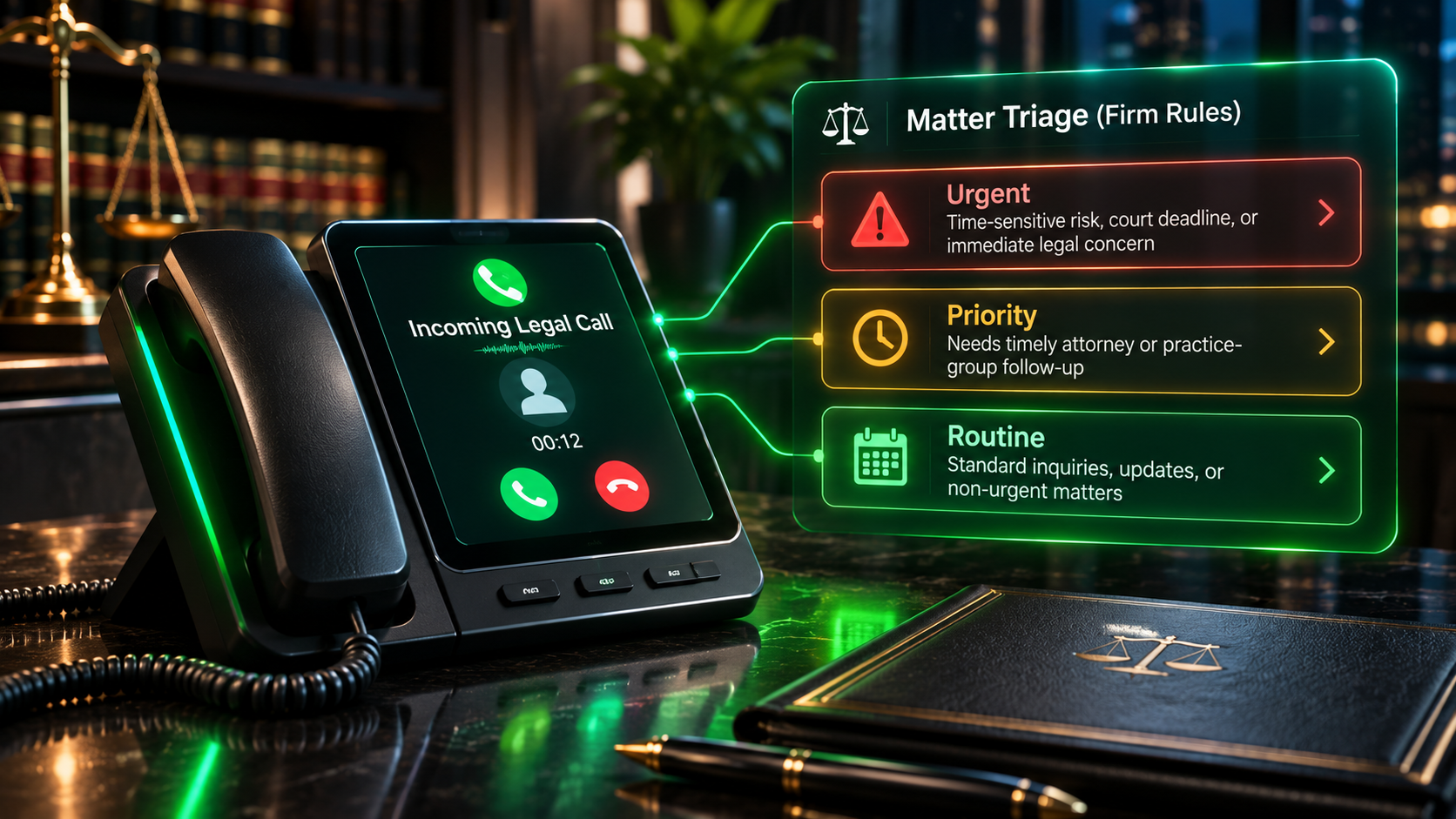
Legal Voice AI call triage identifying firm-defined urgent, priority and routine matter paths
Capture the stated urgency, not a legal diagnosis.An approved intake can preserve the caller’s matter type, reported event, timing, callback details, and unanswered questions for the lawyer or staff member responsible for review.
Priority Path Design

Every priority needs a route, an owner, and a fallback.

A triage flow is only useful when the staff response after the call is defined. Configure the path for the reported trigger, check coverage, attempt the authorized action, and record what actually happened. “Urgent” should not be a label that ends in an unmonitored inbox.

01 — ListenRecognize the reported event or time sensitivity.
02 — ClarifyAsk a minimal approved follow-up; capture a callback route.
03 — Apply rulesMatch matter type, threshold, schedule, and firm ownership.
04 — Attempt actionTransfer, alert, or assign the authorized priority path.
05 — Verify & fall backRecord the outcome; run the next approved step on failure.
After-Hours Coverage & Escalation

A nighttime call should follow the actual on-call rota, not a daytime assumption.

Evenings, weekends, holidays, and office closures can change which attorney or coordinator is responsible. A custom workflow can distinguish business-hour routing from after-hours coverage and use the approved contact tree for each matter category.

If a live transfer is unavailable, the system can attempt a second contact, send a protected urgent alert, or move the call into a monitored staff queue as configured. It should distinguish a transfer attempted from transfer connected, and a notification sent from notification acknowledged.
Reported call type
Example approved route
If the first path fails
High-priority trigger
Time-sensitive matter flagged by firm rules
On-call transfer or priority staff notification
Backup contact and visible unresolved alert
Needs clarification
Possible urgency with missing details
Capture minimum facts; send to designated review owner
Flag uncertainty; avoid downgrading by guesswork
Routine request
Document copy or general update
Standard callback or intake queue
Scheduled follow-up with owner and timestamp
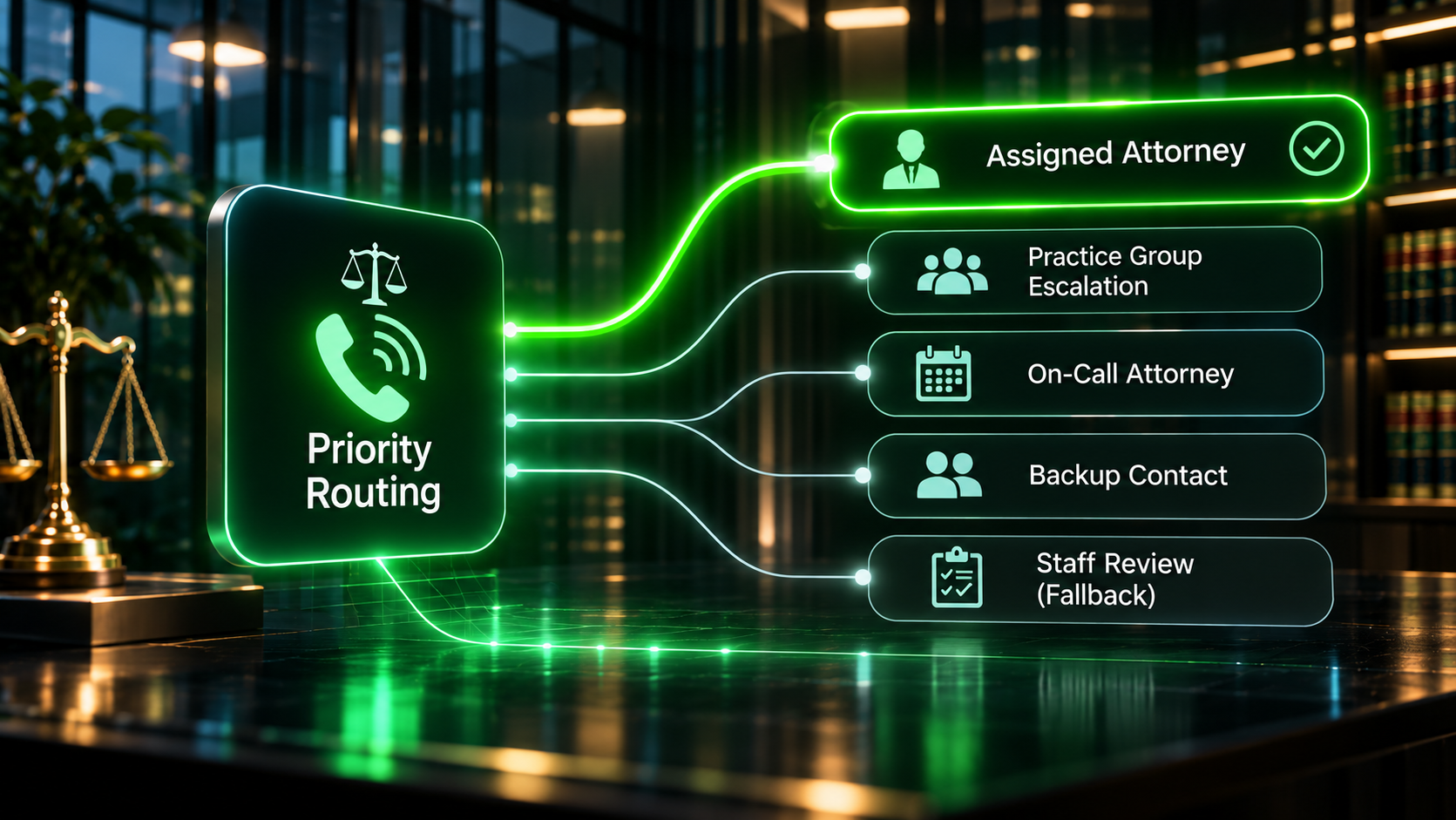
Legal call routing options showing assigned attorney, practice group, on-call attorney and backup escalation paths
Route the call by rule, schedule, and accountability.Separate business-hours, after-hours, and backup destinations so the firm can see which path was attempted and whether anyone actually received the escalation.
Professional & Caller Safety Boundaries

Escalate the call; do not answer the legal question for the attorney.

An urgency assistant can identify a caller’s stated concern and move it to an appropriate human. It must not interpret documents, confirm that a deadline is valid, recommend legal action, claim attorney-client representation, or make promises about response times that the firm has not approved.

Caller safety and confidentiality also require specific rules: emergency-service redirection for immediate danger, limits on substantive case details, minimal access-controlled notifications, and an exception path when a caller reports something outside the approved workflow.

Voice AI can support
  • Capture the caller’s stated event, timing and callback details.
  • Identify approved matter-specific urgency indicators.
  • Attempt an authorized call transfer or secure alert.
  • Log confirmed outcomes and unresolved attempts.
  • Route ambiguity for human review rather than inventing an answer.
Law firm professionals control
  • Legal advice and interpretation of facts or deadlines.
  • Client acceptance, representation, conflicts and privilege.
  • Judgment about the legal urgency of a particular matter.
  • Who is on call, which notifications are permitted and response commitments.
  • Handling exceptions that require legal or ethical discretion.
Phone Systems, Case Tools & Secure Notifications

The escalation chain depends on verified access and dependable outcomes.

Peak Demand can design Voice AI alongside the firm’s existing telephony, case-management environment, staff directories and approved messaging tools. Live transfers, record lookups, alerts, case updates and acknowledgments require appropriate access, permissions and tested connectors.

Where the firm chooses a deeper integration, deterministic middleware can apply the approved conditions, evaluate supported delivery results, and maintain an auditable record of attempted and completed actions. A lighter implementation can start with call intake and structured notifications, without implying it has written to a case file.

TEL

Call transfer outcomes

Distinguish dial initiated, connected, unavailable and failed. Never describe an attempt as a completed handoff.

ON

On-call roster

Use maintained, authorized contacts and coverage windows so calls do not reach stale staff numbers.

ALRT

Priority notifications

Send concise, approved details through permitted channels and apply fallback when delivery is not verified.

CASE

Matter context

Attach existing-client or matter reference only where identity, access and system capability allow it.

LOG

Audit trail

Retain appropriate routing events, timestamps, destination and outcome for operational review under firm policy.

SAFE

Privacy safeguards

Apply secure handling, consent, disclosure, retention and access controls as required by the deployment.
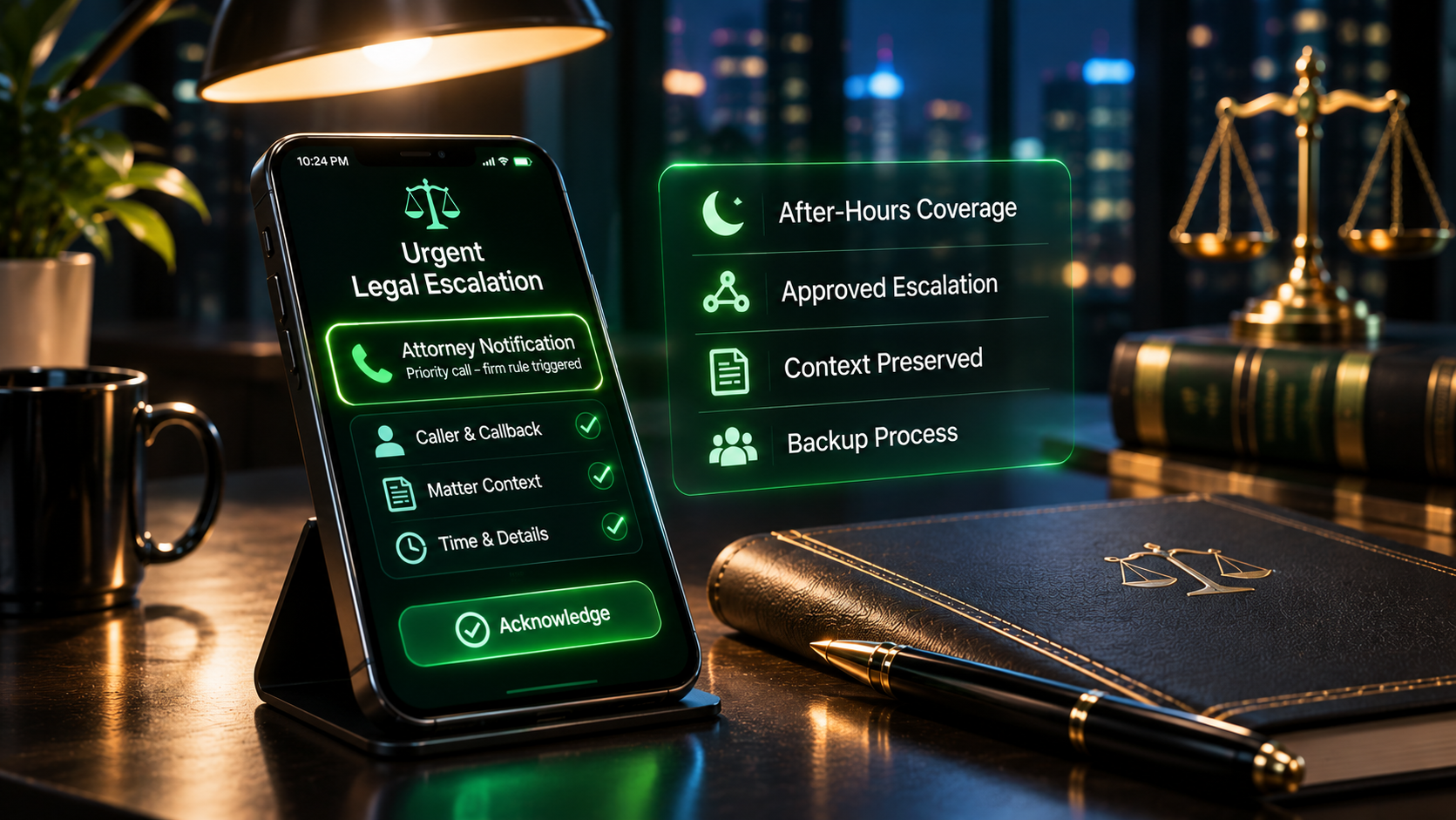
After-hours urgent legal call notification with caller context and approved escalation and backup procedures
An urgent handoff is only complete when its status is known.Show the firm which event triggered escalation, which authorized destination was tried, whether a response was confirmed, and what remains for staff to resolve.
Custom Builds for Legal Workflows

Your matters, coverage windows, and escalation thresholds should shape the build.

A litigation boutique with a single after-hours partner needs a different system from a multi-office full-service firm with specialized practice groups. Peak Demand builds the triage workflow around client-approved rules rather than imposing the same urgent-call script on every law firm.

That can include variable question sets, existing-client identification, thresholds by practice area, office and jurisdiction routing, voicemail or missed-transfer handling, approved emergency language, notification escalation, restricted data capture, and tests for ambiguous calls and overlapping triggers.

Custom does not mean unpredictable.

The caller hears a clear, calm conversation. Matter rules, time windows, transfer outcomes and backup actions live in the controlled workflow behind it.

Start with a documented decision map

List what counts as urgent for each practice group, who owns each path, what may be asked, what counts as a completed escalation, and what the agent must do when information or systems are unavailable.

Legal Urgent Call Triage FAQ

Practical questions about priority rules, coverage, and attorney escalation.

These answers address how a firm can configure urgency handling while reserving legal judgment, client acceptance, and professional decisions to authorized staff.

What is custom urgent call triage for a law firm?
It is a Voice AI intake and routing workflow that listens for firm-defined urgency signals, collects limited approved details, and follows predetermined actions such as urgent notification, live transfer, or callback assignment. It does not make legal judgments.
Can the AI decide whether a legal deadline has been missed?
No. The system can record what the caller reports about a date, document, or deadline, and escalate under the firm’s rules. Only authorized legal professionals should interpret deadlines or advise on consequences.
How is an urgent legal call different from an emergency?
Urgent calls require a faster firm response based on configured criteria. An immediate threat to life or safety calls for emergency services rather than reliance on a law firm answering service. The firm approves the wording and routing.
Can each practice area have its own escalation criteria?
Yes. Litigation, family, criminal, immigration, real estate, and corporate practices may need separate approved question sets, coverage schedules, and destinations.
What does the AI ask before escalating?
Only the minimum approved information needed to route the call: callback details, whether the caller is an existing client, a short matter category, the stated urgency trigger, and any firm-approved reference number.
Can it transfer urgent calls directly to an attorney?
When the firm authorizes a destination and the telephony setup supports it, the workflow can initiate a transfer. Failed or unavailable transfers must have a defined backup path.
What happens if the on-call attorney does not answer?
The workflow follows the firm’s escalation ladder, such as a second approved contact, secure urgent alert, or monitored queue. It should never say an attorney has received a call unless that outcome is confirmed.
Can it operate after business hours?
Yes. The firm can define different hours, on-call rotations, contact methods, and priority thresholds for evenings, weekends, and holidays.
Can the AI identify urgent calls from existing clients?
It can ask for approved identity or matter references and use permitted connected data where available. It should not assume caller identity solely from the phone number.
What if the caller will not share a matter number?
The workflow can still collect an approved minimum description, flag the missing reference, and follow the correct human-review or escalation rule.
Can the AI promise that an attorney will call back immediately?
No. It should communicate only approved expectations and distinguish a sent alert, a successful transfer, and an acknowledged response.
Does the AI give emergency legal advice?
No. It should not interpret facts, recommend legal strategies, or tell callers how to respond to a legal notice. Its role is to recognize routing signals and connect the caller with the firm’s process.
How do we reduce false urgent escalations?
Define clear qualifying triggers, allowed clarifying questions, protected high-risk exceptions, and fallback handling. Test ambiguous and emotionally charged calls without relying on unsupported AI discretion.
How are privileged or sensitive details handled?
The firm should specify the minimum information collected, any mandatory disclosure, approved destinations, access permissions, retention rules, and what the AI should do if a caller begins sharing sensitive substance.
Can this work with our case-management software?
Potentially, subject to permitted integration, API access, security review, and approved data mappings. If integration is unavailable, the system can provide a structured handoff without pretending to update a case file.
What if an urgent notification fails?
The implementation should detect supported failure states, use approved backup channels, and record the outcome for staff review rather than silently assuming delivery.
Can the firm change escalation rules without rebuilding every call flow?
A custom architecture can separate configurable matter categories, thresholds, destinations, and coverage schedules from conversational wording, subject to testing and change approval.
Can it route by office or jurisdiction?
Yes, when the firm supplies validated office, jurisdiction, practice-area, and coverage rules. The workflow should not independently decide which lawyer is legally qualified to act.
What is the difference between urgency triage and conflict-check pre-intake?
Conflict-check pre-intake primarily gathers names and entities for firm-led conflicts review. Urgency triage primarily classifies reported time sensitivity under approved rules and routes the call to the responsible staff or attorney.
What should a firm bring to a triage design meeting?
Sample urgent and routine calls, matter categories, coverage hours, approved urgency triggers, escalation contacts, backup routes, caller disclosures, notification requirements, and existing phone or case-management capabilities.
Build the Actual Escalation Map

Give urgent callers a clear path without putting legal judgment in a script.

Map your matter categories, approved urgency signals, coverage schedules, transfer destinations and backup steps into a controlled Legal Voice AI workflow designed for your firm's operations.

Helpful materials for a first meeting

Anonymized examples of priority calls, escalation rosters, office-hours and after-hours plans, transfer failure cases, approved disclosures, routing owners and software constraints.